AB Math 30-1 Course
Help: I am using Chrome and the website is not refreshing
I am using Chrome and the website is not refreshing, I can't see the latest posts.
Solution 1:
Switch to MS Edge or Opera. These browsers respect the no cache commands in the html pages and will refresh to show the latest posts without any special action.
Solution 2:
Delete this specific website from the cache. To do this follow these steps:
Step 1:
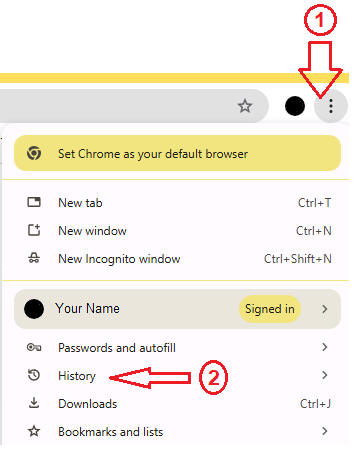
Click the three-dot menu icon in the top-right corner, then select "History" from the dropdown menu. Then select the History as well from the menu that follows.
Alternately, you can use the Ctrl H combination in your Chrome browser to take you directly there.
Step 2:
Type math30.academix.ca in the search box and hit the Enter key.

Delete all the related entries and reload the website again.